


Yandex Weather & Rain Radar
3.1952.00 Reviews
App Specs
- Version
- 26.8.40
- Updated On
- License
- Free
- Downloads
- 50,000,000+
- Developer
- Direct Cursus Computer Systems Trading LLC
- Categories
- Weather
- Platform
- Android
Screenshots
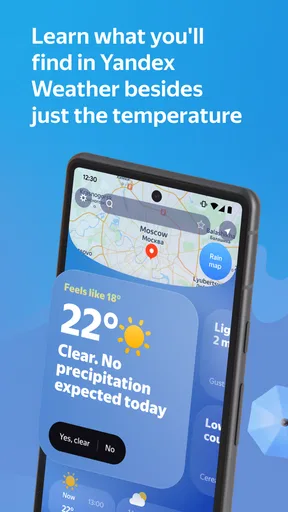
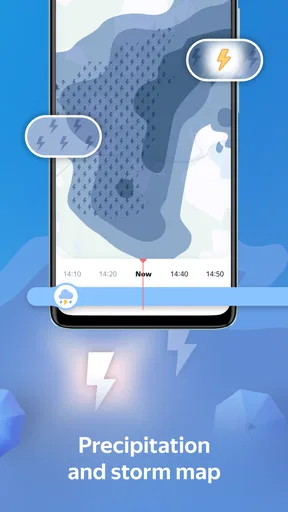
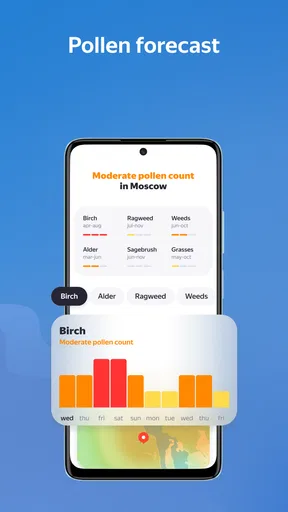
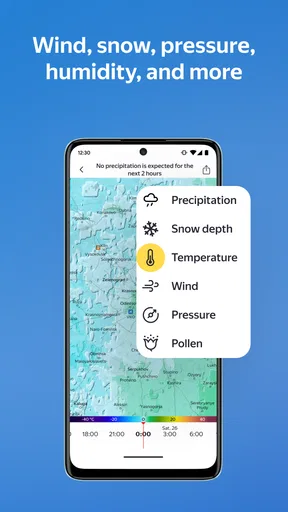
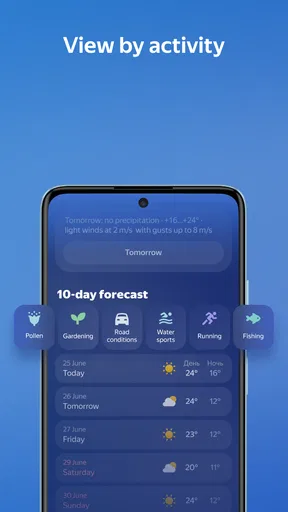
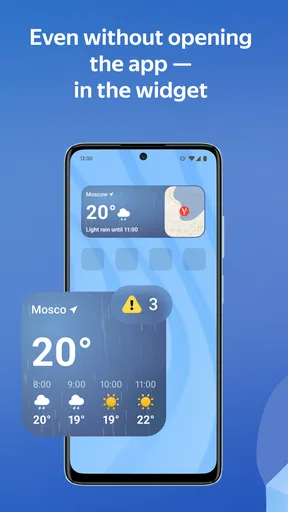
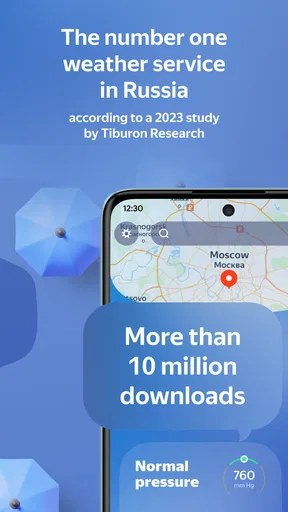
 Analysis by AppCompare
Weather apps matter most when they help me make a decision, not when they simply fill a screen with numbers. I want to know whether to take a jacket, change my route, or move an outdoor plan indoors. Yandex Weather & Rain Radar is built around that everyday need, with a local forecast, radar, maps, alerts, and widgets. I find it most useful as a quick planning tool: it can help me judge what the weather may do near me, while still leaving room for common sense when conditions are changeable.
Who will get the most from a local forecast
I can see this weather app fitting people who check the sky several times a day: commuters deciding whether to walk, parents planning a trip to the park, or anyone who wants a closer look at incoming precipitation before heading out. The radar adds context that a simple temperature reading cannot. If the forecast suggests rain, I can inspect the map and think about whether the timing matters for my route or an outdoor errand.
It also makes sense for people who keep an eye on more than one place. You can add several cities and switch among them, which is handy when I am traveling or checking conditions for relatives elsewhere. That is a practical alternative to repeatedly searching for a different location in a general web browser, although people who only care about one daily temperature may find a simpler forecast app quicker.
Readable at a glance, with detail available
The first screen aims to make routine checks straightforward, while the forecast details give curious users more to examine. I like the split between a quick glance and the option to look deeper at wind, humidity, pressure, and hourly changes. Those details are useful when the temperature alone is misleading: wind can make a short walk feel very different, and humidity can change how comfortable a warm afternoon seems.
That layered approach is a useful design choice for different levels of weather knowledge. I do not need to understand every measurement to decide what to wear, but the extra information is there when I want it. The widgets can also make weather information easier to reach from the home screen, so a person who prefers not to open an app for every check may appreciate that shortcut.
Radar and alerts in an ordinary day
Here is a realistic use case: I am about to leave for a grocery run and see a chance of showers later. Instead of treating that as a yes-or-no prediction, I can look at the radar, compare the expected timing with how long I will be out, and decide whether to bring an umbrella. For a longer walk or an outdoor gathering, that extra look can help me choose a backup plan before I am already caught in bad weather.
Alerts are useful when a sudden change could affect plans, but I would treat them as prompts to check conditions rather than guarantees that every local shift will be caught. Radar is also most valuable when I use it to understand the broad movement of precipitation, not to assume that a map can settle exactly what will happen on one particular street. That distinction helps keep the app useful without asking it to do more than a forecast can reasonably do.
Worth Reading Before You Choose

Baby Panda World Brings Quick Play to Modern Phones, but Its Game Library Feels Busy

ESPN’s Live Game View Makes Following Close Games Easier

QuizzLand Review: A Good Fit for Short Trivia Breaks, Not Every Player

Basketball Stars: Multiplayer Is Fast, but Can It Recover When Matches Go Wrong?

WEBTOON Turns Phone Updates Into a Better Reading Routine

Link to Windows Runs on Shared Habits, Not Social Feeds
Using it comfortably in different situations
On a quick check, concise icons and a visual map can be easier to scan than a dense block of weather text. If I am outside, moving between places, or trying to make a fast decision, seeing the forecast rather than reading a long explanation is a real convenience. At home, I can take more time with the hourly outlook and atmospheric details. The app’s mix of brief summaries and deeper information suits both habits better than an interface that only serves one kind of user.
There are still limits for people with different access needs. A color-coded radar may be harder to interpret for someone who has difficulty distinguishing some colors, and small visual details can be challenging on a compact screen. I would not rely on the map alone in those situations; checking the written forecast and alerts as well gives more than one way to understand the conditions. Anyone who depends on particular text, contrast, or assistive-technology settings should try the app on their own device before making it their only weather source.
How it compares with simpler weather apps
Compared with a basic forecast that shows only the current temperature and a short outlook, Yandex Weather gives me more ways to investigate a change: radar, location switching, alerts, widgets, and additional weather measurements. That breadth is useful when weather affects a real plan, but it can be more than I need for a quick glance. A lightweight app may be the better fit if I want the fewest screens and details; someone who needs specialized meteorological analysis may prefer a service designed for that deeper purpose.
The practical trade-off is that extra information can take longer to load or navigate. I have found that switching between cities and opening some parts of the app can feel slow at times. If I am in a hurry, I would check the main forecast first and open the radar only when it can change my decision. That small habit keeps the app focused on what matters instead of turning every weather check into a deep dive.
Getting Started with Yandex Weather
First off, downloading the Yandex Weather & Rain Radar app is a breeze. It’s available on both Android and iOS, so no matter your device allegiance, you’re covered. As soon as you fire it up, you’re welcomed with a sleek, user-friendly interface. Honestly, it feels like the designers knew exactly what we needed—a clear, concise, and visually appealing layout.
Features That Make It Shine
One of the standout features is the rain radar. It’s not just a static image; it’s interactive. You can zoom in and out, move around, and see real-time updates on precipitation. This is a game-changer, especially if you’re planning outdoor activities and want to avoid getting caught in a downpour.
And let’s talk about the accuracy. I’ve compared its predictions with a few other apps, and Yandex seems to hit the mark more often than not. Whether it’s forecasting rain, snow, or sunshine, it’s reliable. The app provides hour-by-hour forecasts, which is perfect for those of us who like to plan our day down to the last detail.
Personalized Weather Insights
Another neat feature is the ability to customize the app based on your location preferences. It’s not just about your current location; you can add multiple cities and switch between them effortlessly. This is super handy if you’re a frequent traveler or have family in different parts of the world.
The app also sends timely notifications. You’ll get alerts about severe weather conditions, so you can stay safe and adjust your plans accordingly. Plus, the notifications aren’t annoying or intrusive—they’re just the right amount of informative.
User Experience and Interface
Now, onto the user experience. Navigating through Yandex Weather is pretty intuitive. Everything is where you expect it to be, and there’s no steep learning curve. The color scheme is easy on the eyes, and the icons are straightforward, making the app accessible for users of all ages.
If you’re someone who loves diving into details, the app doesn’t disappoint. There are graphs, wind speed data, humidity levels, and even atmospheric pressure details. It’s like having a personal meteorologist in your pocket.
A Few Quirks
No app is perfect, and there are a couple of areas where Yandex Weather could improve. Sometimes, the loading time for certain features is a bit slow, especially when switching between different cities. Also, while the app supports multiple languages, the English translations could use a little polish here and there.
Despite these minor hiccups, the overall experience remains solid and satisfying. The developers seem committed to rolling out updates, so I’m optimistic these issues will be addressed.
Details worth knowing before installing
Yandex Weather is a free weather app from Direct Cursus Computer Systems Trading LLC. It is rated for Everyone, has been available since December 24, 2010, and its current version is 26.6.10. The app has more than 50 million installs and an average rating of 3.1 from around 831,000 ratings, so there is a large audience, but opinions are mixed. I would treat that rating as a reason to test it against my own routine rather than assume it will suit every device or location.
It runs on Android 8.0 or later. For someone choosing between this and a phone’s built-in weather view, the choice is less about whether one is universally better and more about how often I use radar, city switching, and detailed conditions. If those tools matter, the extra options are worthwhile; if I only check the temperature once in the morning, the built-in option may be enough.
A more useful way to check changing conditions
One practical habit is to use the forecast in two passes. I first look at the hourly outlook to identify the part of the day that might affect me, then open the radar only for that window. This avoids overreacting to a broad daily rain symbol when I have flexibility, while still giving me a reason to carry a light layer or reschedule an outdoor commitment. It is a better use of the app than refreshing the map repeatedly without a specific question in mind.
For travel, I would add a destination before leaving rather than wait until I am already on the move. That makes the location switch useful for comparing the day at home with the place I am heading to. It is especially helpful when packing: checking wind and hourly conditions can influence whether I choose a warmer layer, even when two places show similar temperatures. The trade-off is that saved locations can make the interface feel busier if I keep adding places I rarely check, so I would remove or ignore destinations that no longer matter.
Where confidence should have limits
Forecast confidence is never the same in every situation. A broad outlook can be enough for deciding whether to plan a picnic, but a rapidly changing shower is a tougher call, and a radar image should not be treated as a promise about an exact arrival time. I use the map to improve my judgment, not to replace it. For activities where weather has safety consequences, I would also pay attention to official local guidance rather than depending on a single phone app.
The same caution applies to alerts. They are convenient because they can bring a change to my attention without a constant manual check, but notifications are only helpful if I notice them and understand what action to take. If alerts become distracting, I would review which ones I actually need instead of turning off every notification or letting every message interrupt the day. A weather tool should support attention, not compete with it.
Choosing a comfortable routine
Different people will benefit from different ways of reading the same forecast. Someone who prefers visual information may start with icons and radar; someone who finds maps tiring can focus on the written forecast and the hourly sequence. I would also use the home-screen widget for routine checks and reserve the full app for decisions that need more context. That division reduces unnecessary navigation and makes the detailed screens easier to approach when they are genuinely useful.
For anyone who finds color-heavy displays difficult, the key question is whether the accompanying text provides enough clarity on their own device. Screen size, display settings, and personal preferences all affect that experience. I would test the map in ordinary daylight and in the lighting where I usually check my phone, and avoid relying on color alone when making an important decision. That is a practical check, not a claim that the app meets a particular accessibility standard.
Who may prefer another option
I would skip this app if I want a nearly empty screen with only a temperature and a simple daily summary, or if slow loading would frustrate me during frequent checks. A built-in phone forecast can be more convenient for that minimal routine. On the other hand, people who want radar, several saved places, alerts, and weather measurements in one place have a clearer reason to try Yandex Weather. The right choice depends on whether those extra layers solve a real problem in your day.
It is also not my first choice for someone who needs highly specialized forecasting or a strongly text-first experience but finds the map central to the app. The useful question before installing is simple: do I often change plans based on when rain may arrive, or do I just need a rough idea of the day? If it is the first, the radar and hourly view can earn their place; if it is the second, a simpler alternative may be less work.
Final Thoughts
All in all, the Yandex Weather & Rain Radar app is a reliable companion for anyone looking to stay ahead of the weather. Its combination of accuracy, ease of use, and comprehensive features makes it a standout choice. Whether you’re a weather geek or just someone who likes to be prepared, this app is definitely worth a spot on your home screen.
In a world where our plans can be as unpredictable as the weather itself, having an app like Yandex Weather on hand is like carrying around a little bit of sunshine in your pocket. Give it a shot, and you might just find it as indispensable as I have!
My inclusive verdict
I see Yandex Weather as a capable everyday choice for people who want more context than a basic forecast provides, especially if they make decisions around rain, travel, or outdoor plans. The app’s combination of a quick overview and deeper weather details gives different users more than one way into the information, though the map, loading delays, and occasional translation roughness can get in the way. I would try it for a week of ordinary routines and keep it if the radar and hourly view genuinely help me plan. If they do not, a simpler forecast may be the more comfortable fit.
Pros
- Accurate weather updates and forecasts.
- User-friendly interface and design.
- Customizable weather notifications.
- Detailed rain radar and maps.
- Minimal data usage
- efficient app.
Cons
- Frequent ads interrupt app usage.
- Limited language support available.
- Occasional app crashes reported.
- Some features require premium access.
- Battery consumption can be high.
FAQs for Yandex Weather & Rain Radar
What features does Yandex Weather & Rain Radar offer?
Yandex Weather & Rain Radar provides detailed weather forecasts, including temperature, humidity, and wind speed. It also features real-time rain radar maps to track weather changes, hourly and daily forecasts, and a user-friendly interface. Additionally, the app offers notifications for severe weather alerts and customizable widgets for easy access.
Is Yandex Weather & Rain Radar available for both Android and iOS?
Yes, Yandex Weather & Rain Radar is available for both Android and iOS devices. You can download it from the Google Play Store for Android or the Apple App Store for iOS. The app is optimized for both platforms, ensuring a seamless user experience regardless of your device.
How accurate are the weather forecasts in Yandex Weather & Rain Radar?
Yandex Weather & Rain Radar is known for its accuracy, utilizing advanced meteorological data and algorithms to provide reliable forecasts. It uses data from multiple sources to enhance precision, particularly for local weather conditions. However, like all weather apps, minor discrepancies might occur due to changing natural conditions.
Does Yandex Weather & Rain Radar offer severe weather alerts?
Yes, Yandex Weather & Rain Radar provides timely notifications for severe weather conditions. Users can customize alerts to receive information about storms, heavy rain, or other adverse weather events. This feature helps users stay informed and make necessary preparations to ensure safety during severe weather.
Is there a cost to download or use Yandex Weather & Rain Radar?
Yandex Weather & Rain Radar is free to download and use. While the app provides most features at no cost, it may offer in-app purchases or ads to access premium features or remove advertisements. Users can enjoy the core functionalities without any mandatory charges.


